12.11. logging模块
python的logging模块提供了标准的日志接口,你可以通过它存储各种格式的日志.
日志级别大小关系为:
critical > error > warning > info > debug > notset也可自定义日志级别
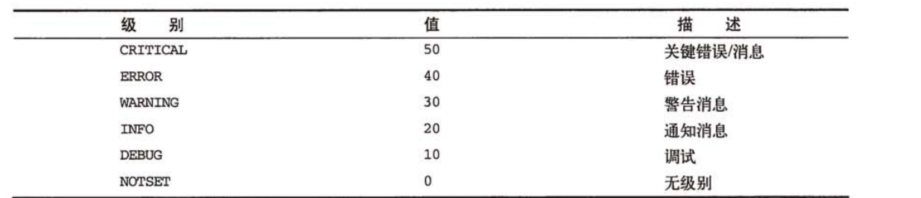
默认级别是WARNING,
表示只有WARING和比WARNING更严重的事件才会被记录到日志内,低级别的信息会被忽略。
因此,默认情况下,DEBUG和INFO会被忽略,WARING、ERROR和CRITICAL会被记录。
import logging
logging.debug('debug')                 # 默认日志级别为 warning ,故debug日志不做打印
logging.warning('warning')             # 达到默认日志级别为WARNING,打印到屏幕 warning
eg1
#!/usr/bin/env python
#-*- coding:utf8 -*-
# auther; 18793
# Date:2019/5/21 16:16
# filename: logging日志模块.py
import logging
logging.basicConfig(level=logging.ERROR)    #设置日志级别为ERROR

logging.debug("这是DEBUG级别信息")
logging.info("这是INFO级别信息")
logging.warning("这是WARNING级别信息")
logging.error("这是ERROR级别信息")
logging.critical("这是CRITICAL级别信息")
输出结果
ERROR:root:这是ERROR级别信息
CRITICAL:root:这是CRITICAL级别信息
eg2
getLogger()函数创建自己的日志器对象,本例中__name__是当前模块名。使用自定义日志器的示例代码如下:
#!/usr/bin/env python
#-*- coding:utf8 -*-
# auther; 18793
# Date:2019/5/21 16:16
# filename: logging日志模块.py
import logging
logging.basicConfig(level=logging.DEBUG)    #设置日志级别为DEBUG
logger = logging.getLogger(__name__)

logger.debug("这是DEBUG级别信息")
logger.info("这是INFO级别信息")
logger.warning("这是WARNING级别信息")
logger.error("这是ERROR级别信息")
logger.critical("这是CRITICAL级别信息")
输出结果
DEBUG:__main__:这是DEBUG级别信息
INFO:__main__:这是INFO级别信息
WARNING:__main__:这是WARNING级别信息
ERROR:__main__:这是ERROR级别信息
CRITICAL:__main__:这是CRITICAL级别信息
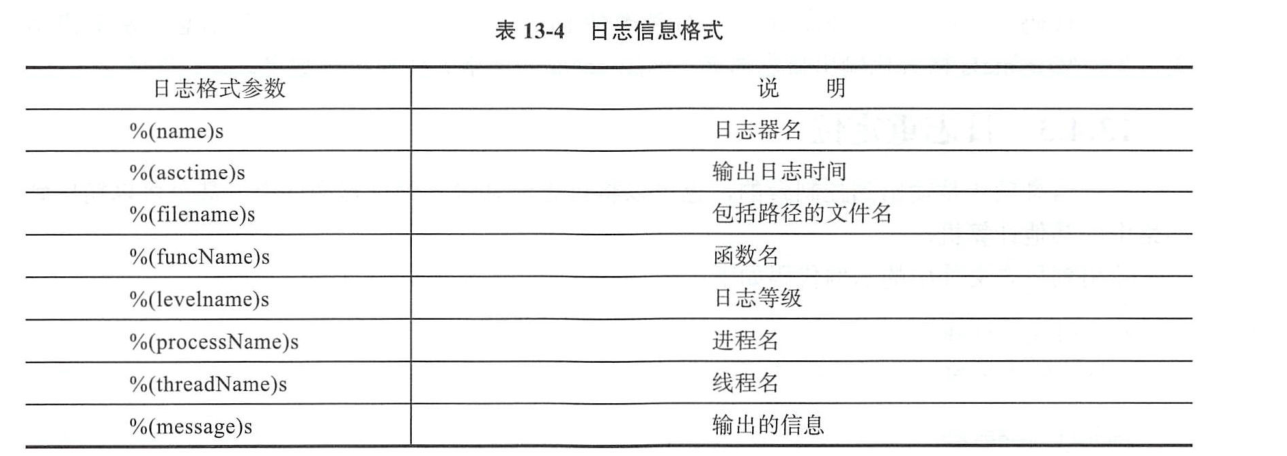
12.11.1. 日志信息格式化
eg2
#!/usr/bin/env python
# -*- coding:utf8 -*-
# auther; 18793
# Date:2019/5/21 16:16
# filename: logging日志模块.py
import logging

logging.basicConfig(level=logging.INFO, format='%(asctime)s - %(threadName)s - %(name)s - %(funcName)s - %(levelname)s'
                                               '-%(message)s')

logger = logging.getLogger(__name__)

logger.debug("这是DEBUG级别信息.")
logger.info("这是INFO级别信息.")
logger.warning("这是WARNING级别信息.")
logger.error("这是ERROR级别信息。")
logger.critical("这是CRITICAL级别信息。")


def funlog():
    logger.info("进入funlog函数。")


logger.info("调用funlog函数。")
funlog()
输出结果
2019-05-21 16:31:33,371 - MainThread - __main__ - <module> - INFO-这是INFO级别信息.
2019-05-21 16:31:33,371 - MainThread - __main__ - <module> - WARNING-这是WARNING级别信息.
2019-05-21 16:31:33,371 - MainThread - __main__ - <module> - ERROR-这是ERROR级别信息。
2019-05-21 16:31:33,371 - MainThread - __main__ - <module> - CRITICAL-这是CRITICAL级别信息。
2019-05-21 16:31:33,371 - MainThread - __main__ - <module> - INFO-调用funlog函数。
2019-05-21 16:31:33,371 - MainThread - __main__ - funlog - INFO-进入funlog函数。
12.11.2. 日志重定位
将日志信息输出到test.log文件中
eg
# 日志重定位
import logging

logging.basicConfig(level=logging.INFO, format='%(asctime)s - %(threadName)s - %(name)s - %(funcName)s - %(levelname)s'
                                               '-%(message)s', filename="test.log")

logger = logging.getLogger(__name__)

logger.debug("这是DEBUG级别信息.")
logger.info("这是INFO级别信息.")
logger.warning("这是WARNING级别信息.")
logger.error("这是ERROR级别信息。")
logger.critical("这是CRITICAL级别信息。")


def funlog():
    logger.info("进入funlog函数。")


logger.info("调用funlog函数。")
funlog()
#!/usr/bin/env python
# -*- coding:utf8 -*-
# auther; 18793
# Date:2020/1/7 14:13
# filename: Logging01.py
__author__ = 'hstking hstking@hotmail.com'

import logging


class TestLogging(object):
    def __init__(self):
        logFormat = '%(asctime)-12s %(levelname)-8s %(name)-10s %(message)-12s'
        logFileName = './testLog.txt'

        logging.basicConfig(level=logging.INFO,
                            format=logFormat,
                            filename=logFileName,
                            filemode='w')

        logging.debug('debug message')
        logging.info('info message')
        logging.warning('warning message')
        logging.error('error message')
        logging.critical('critical message')


if __name__ == '__main__':
    tl = TestLogging()
eg
import logging
LOG_FILENAME = 'hello.py'
logging.basicConfig(filename=LOG_FILENAME, level=logging.DEBUG,)
logging.debug('This message should go to the log file')
with open(LOG_FILENAME, 'rt') as f:
    prg = f.read()
print('FILE:')
print(prg)
定义一个logging类
#!/usr/bin/env python
# -*- coding:utf8 -*-
# auther; 18793
# Date:2019/9/17 10:40
# filename: loggingClass.py
import logging
import getpass
import sys


# 定义MyLog类
class MyLog(object):
    '''
    这个类用于创建一个自用的log
    '''

    def __init__(self):  # 类MyLog的构造函数
        user = getpass.getuser()
        self.logger = logging.getLogger(user)
        self.logger.setLevel(logging.DEBUG)
        logFile = './' + str(sys.argv[0]).split("/")[-1][0:-3] + '.log'  # 日志文件名
        print(logFile)
        formatter = logging.Formatter('%(asctime)-12s %(levelname)-8s %(name)-10s %(message)-12s')

        ''' 日志显示到屏幕上并输出到日志文件内'''
        logHand = logging.FileHandler(logFile)
        logHand.setFormatter(formatter)
        logHand.setLevel(logging.ERROR)  # 只有错误才会被记录到logfile中

        logHandSt = logging.StreamHandler()
        logHandSt.setFormatter(formatter)

        self.logger.addHandler(logHand)
        self.logger.addHandler(logHandSt)

    ''' 日志5个基本对应以下5个函数  '''

    def debug(self, msg):
        self.logger.debug(msg)

    def info(self, msg):
        self.logger.info(msg)

    def warn(self, msg):
        self.logger.warn(msg)

    def error(self, msg):
        self.logger.error(msg)

    def critical(self, msg):
        self.logger.critical(msg)


if __name__ == '__main__':
    mylog = MyLog()
    mylog.debug("I'm debug")
    mylog.warn("I'm warn")
    mylog.error("I'm error")
    mylog.critical("I'm critical")
· 将loggingClass.py作为模块导入使用
#!/usr/bin/env python
# -*- coding:utf8 -*-
# auther; 18793
# Date:2019/9/17 12:27
# filename: testmylog.py

from loggingClass import MyLog

if __name__ == '__main__':
    t1 = MyLog()
    t1.info("This is info")
    t1.debug("This is debug")
    t1.warn("This is warnning")
    t1.error("This is error")
    t1.critical("This is critcal")
使用配置文件
eg
#!/usr/bin/env python
# -*- coding:utf8 -*-
# auther; 18793
# Date:2019/5/21 16:37
# filename: logging读取配置文件.py
import logging
import logging.config

logging.config.fileConfig("logger.conf")        #配置信息从文件logger.conf中读取
logger = logging.getLogger("logger1")           #从配置文件中读取logger1配置信息创建日志器

logger.debug("这是DEBUG级别信息")
logger.info("这是INFO级别信息")
logger.warning("这是WARNING级别信息")
logger.error("这是ERROR级别信息")
logger.critical("这是CRITICAL级别信息")


def funlog():
    logger.info("进入funlog函数")


logger.info("调用funlog函数。")
funlog()
logger.conf
使用时注意要去掉 #注释的信息
[loggers]                       #配置日志器
keys=root,simpleExample         #日志器包含了root和simpleExample

[logger_root]                   #配置根日志器
level=DEBUG
handlers=consoleHandler         #日志器对应的处理器

[logger_simpleExample]          #配置simpleExample日志器
level=DEBUG
handlers=fileHandler            #日志器对应的处理器
qualname=logger1                #日志器名称
propagate=0

[handlers]                      #配置处理器
keys=consoleHandler,fileHandler #包含了两个处理器

[handler_consoleHandler]       # 配置consoleHandler日志器
class=StreamHandler
level=DEBUG
formatter=simpleFormatter
args=(sys.stdout,)

[handler_fileHandler]          #配置fileHandler日志器
class=FileHandler
level=DEBUG
formatter=simpleFormatter
args=('test.log','a')

[formatters]                  #配置格式化器
keys=simpleFormatter          #日志器包含simpleFormatter


[formatter_simpleFormatter]   #配置simpleFormatter格式化器
format=%(asctime)s %(filename)s[line:%(lineno)d] %(funcName)s %(levelname)s %(message)s
执行之后,日志会记录到test.log中。
logging.basicConfig                    # 通过logging.basicConfig函数对日志的输出格式及方式做相关配置
    # basicConfig 相关参数帮助
    filename               # 指定日志文件名
    filemode               # 和file函数意义相同,指定日志文件的打开模式,'w'或'a'
    datefmt                # 指定时间格式,同time.strftime()
    level                  # 设置日志级别,默认为logging.WARNING
    stream                 # 指定将日志的输出流,可以指定输出到sys.stderr,sys.stdout或者文件,默认输出到sys.stderr,当stream和filename同时指定时,stream被忽略
    format                 # 指定输出的格式和内容,format可以输出很多有用信息,如上例所示:
        %(levelno)s        # 打印日志级别的数值
        %(levelname)s      # 打印日志级别名称
        %(pathname)s       # 打印当前执行程序的路径,其实就是sys.argv[0]
        %(filename)s       # 打印当前执行程序名
        %(funcName)s       # 打印日志的当前函数
        %(lineno)d         # 打印日志的当前行号
        %(asctime)s        # 打印日志的时间
        %(thread)d         # 打印线程ID
        %(threadName)s     # 打印线程名称
        %(process)d        # 打印进程ID
        %(message)s        # 打印日志信息

logging.basicConfig(level=logging.DEBUG,
                format='%(asctime)s %(filename)s[line:%(lineno)d] %(levelname)s %(message)s',
                datefmt='%a, %d %b %Y %H:%M:%S',
                filename='myapp.log',
                filemode='w')
# 日志级别warning或高于warning的会写入文件 myapp.log 中
读取配置文件,设置多个日志记录器
logging.config.fileConfig("logger.conf")        # 加载配置文件
logger = logging.getLogger("example02")         # 使用已定义的日志记录器
logger.conf
###############################################
[loggers]
keys=root,example01,example02    # 设置三种日志记录器
[logger_root]                    # 针对单一种设置
level=DEBUG
handlers=hand01,hand02
[logger_example01]
handlers=hand01,hand02           # 使用2中处理方式 应该是根据不同级别区分的
qualname=example01
propagate=0
[logger_example02]
handlers=hand01,hand03
qualname=example02
propagate=0
###############################################
[handlers]                      # 不同的处理方式
keys=hand01,hand02,hand03       # 三种方式的名字
[handler_hand01]                # 第一种方式配置
class=StreamHandler             # 发送错误信息到流
level=INFO                      # 日志级别
formatter=form02                # 日志的格式方式
args=(sys.stderr,)
[handler_hand02]
class=FileHandler               # FileHandler写入磁盘文件
level=DEBUG
formatter=form01
args=('myapp.log', 'a')         # 追加到日志文件
[handler_hand03]
class=handlers.RotatingFileHandler
level=INFO
formatter=form02
args=('myapp.log', 'a', 10*1024*1024, 5)    # 追加日志并切割日志
###############################################
[formatters]                                # 针对不同处理日志方式设置具体的日志格式
keys=form01,form02
[formatter_form01]
format=%(asctime)s %(filename)s[line:%(lineno)d] %(levelname)s %(message)s    # 日志列
datefmt=%a, %d %b %Y %H:%M:%S               # 时间格式
[formatter_form02]
format=%(name)-12s: %(levelname)-8s %(message)s
datefmt=
日志记录类的代码示例:
import logging
from logging import handlers


class Logger(object):
    #  日志级别关系映射
    level_relations = {
        'debug': logging.DEBUG,
        'info': logging.INFO,
        'warning': logging.WARNING,
        'error': logging.ERROR,
        'crit': logging.CRITICAL
    }

    def __init__(self, filename, level='info', when='D', backCount=3, fmt='%(asctime)s - %(pathname)s[line:%(lineno)d] - %(levelname)s: %(message)s'):
        self.logger = logging.getLogger(filename)
        format_str = logging.Formatter(fmt)     # 设置日志格式
        self.logger.setLevel(self.level_relations.get(level))   # 设置日志级别
        sh = logging.StreamHandler()    # 往屏幕上输出
        sh.setFormatter(format_str)     # 设置屏幕上显示的格式
        # 往文件里写入 指定间隔时间自动生成文件的处理器
        th = handlers.TimedRotatingFileHandler(filename=filename, when=when, backupCount=backCount, encoding='utf-8')
        #  实例化TimedRotatingFileHandler
        #  interval是时间间隔,backupCount是备份文件的个数,如果超过这个个数,就会自动删除,when是间隔的时间单位,单位有以下几种:
        # S 秒
        # M 分
        # H 小时、
        # D 天、
        # W 每星期(interval==0时代表星期一)
        # midnight 每天凌晨
        th.setFormatter(format_str)     # 设置文件里写入的格式
        self.logger.addHandler(sh)      # 把对象加到logger里
        self.logger.addHandler(th)


if __name__ == '__main__':
    log = Logger('all.log',level='debug')
    log.logger.debug('debug')
    log.logger.info('info')
    log.logger.warning('警告')
    log.logger.error('报错')
    log.logger.critical('严重')
    Logger('error.log', level='error').logger.error('error')
基于YAML配置文件的日志
这里要先通过pip安装yaml模块:
pip install pyyaml
logging.conf.yaml配置文件内容如下:
version: 1
formatters:
  simple:
    format: '%(asctime)s - %(name)s - %(levelname)s - %(message)s'
handlers:
  console:
    class: logging.StreamHandler
    level: DEBUG
    formatter: simple
    stream: ext://sys.stdout
loggers:
  simpleExample:
    level: DEBUG
    handlers: [console]
    propagate: no
root:
  level: DEBUG
  handlers: [console]
使用代码示例:
#!/usr/bin/env python
#-*- coding:utf8 -*-
# auther; 18793
# Date:2019/12/23 22:55
# filename: logging_yaml.py
import logging
import logging.config
import yaml

# 通过yaml文件配置logging
f = open("logging.conf.yaml")
dic = yaml.load(f)
f.close()
logging.config.dictConfig(dic)

# 创建logger
logger = logging.getLogger('simpleExample')

# 输出日志
logger.debug('debug message')
logger.info('info message')
logger.warn('warn message')
logger.error('error message')
logger.critical('critical message')

'''
输出信息
2019-12-23 22:55:44,532 - simpleExample - DEBUG - debug message
2019-12-23 22:55:44,532 - simpleExample - INFO - info message
2019-12-23 22:55:44,532 - simpleExample - WARNING - warn message
2019-12-23 22:55:44,532 - simpleExample - ERROR - error message
2019-12-23 22:55:44,532 - simpleExample - CRITICAL - critical message

'''
一个logging的方法。
def configure_logging(self):
        """
        Configure logging to log to std output as well as to log file
        """
        log_level = logging.DEBUG

        log_filename = datetime.now().strftime('%Y-%m-%d') + '.log'
        sp_logger = logging.getLogger('sp_logger')
        sp_logger.setLevel(log_level)
        formatter = logging.Formatter('%(asctime)s : %(levelname)s : %(message)s')

        fh = logging.FileHandler(filename=self.log_dir + log_filename)
        fh.setLevel(log_level)
        fh.setFormatter(formatter)
        sp_logger.addHandler(fh)

        sh = logging.StreamHandler(sys.stdout)
        sh.setLevel(log_level)
        sh.setFormatter(formatter)
        sp_logger.addHandler(sh)
        self.logger = sp_logger
        return self.logger

def __repr__(self):
    return "{}()".format(self.__class__.__name__)

def debug(self, *args, **kwargs):
    self.logger.debug(*args, **kwargs)

def info(self, *args, **kwargs):
    self.logger.info(*args, **kwargs)

def warn(self, *args, **kwargs):
    self.logger.warn(*args, **kwargs)

def error(self, *args, **kwargs):
    self.logger.error(*args, **kwargs)

def critical(self, *args, **kwargs):
    self.logger.critical(*args, **kwargs)
参考资料:
重要的日志模块logging
链接:http://www.cnblogs.com/wj-1314/p/8607515.html